CNC fillet radius vs end mill size is a one-way constraint: the internal radius on the print cannot be smaller than the mill radius, or the shop must switch to a smaller cutter. Pick the hogging mill from the pocket width first (often 6 mm, 8 mm, or 10 mm), then set the internal fillet at least to half that diameter. Prefer 0.5-1.0 mm extra so a finishing mill can clean the wall without dwelling in a matching corner. A 0.2 mm CAD fillet is not free. It is a 0.4 mm mill, a long cycle, and chatter in a deep pocket. ASME Y14.5-2018 still wants the radius stated or defaulted. ISO 2768-1 (1989) will not invent a mill for you.
You are detailing a pocket for a US or EU RFQ that will land in a Dongguan mill. Pick the radius from the tools you want in the cut, not from a default 0.5 mm sketch fillet.
Key takeaways
- Internal R ≥ mill radius is the hard floor. Smaller R means a smaller mill, not a clever programmer.
- Prefer a slightly larger fillet than the hogging mill so a finisher can cut the wall without packing into the corner.
- Deep pockets need larger mills for stiffness, which means larger fillets, not longer 2 mm tools.
- Sharp corners are a process choice (dogbone, EDM, or a later slot), not a milling default.
CNC fillet radius vs end mill size: the rule in one table
Use this table as the decision. Choose the mill you want for the pocket, then put at least the minimum internal R on the print. If you can live with the practical R, do that. That row usually quotes faster.
| End mill diameter | Mill radius | Minimum internal R (tool just fits) | Practical internal R (better quote) | Best for | Watch-out |
|---|---|---|---|---|---|
| 4 mm | 2.0 mm | 2.0 mm | 2.5 mm | Small pockets, M3-M4 bosses | Still slow in deep wells |
| 6 mm | 3.0 mm | 3.0 mm | 3.5-4.0 mm | Default 3-axis pockets | Will not fit a 5 mm-wide slot |
| 8 mm | 4.0 mm | 4.0 mm | 5.0 mm | Open housings, hogging | Needs width and fillet room |
| 10 mm | 5.0 mm | 5.0 mm | 6.0 mm | Large cavities, aluminum | Overkill on tiny parts |
Bottom line: pick mill diameter from pocket width and depth, then set CNC fillet radius vs end mill size so R is at least half the mill, preferably a bit more.
If the part is mostly prismatic plates, CNC milling with a 6 mm or 8 mm mill is the usual cost floor. Do not specify a 0.8 mm internal R and then ask why the cycle looks like a finishing job.
ISO 2768-m on the pocket outline does not change this table. A ±0.2 mm wall location still needs a mill that fits the corner. ASME Y14.5-2018 wants the radius dimensioned or covered by a default note such as “internal R 3.5 unless noted.”
Typical as-machined pocket walls in 6061-T6 are Ra 3.2 µm with these mills. If you also call Ra 0.8 µm in the corner, you are asking the tiny mill to finish twice.
Why the tool diameter sets the internal radius
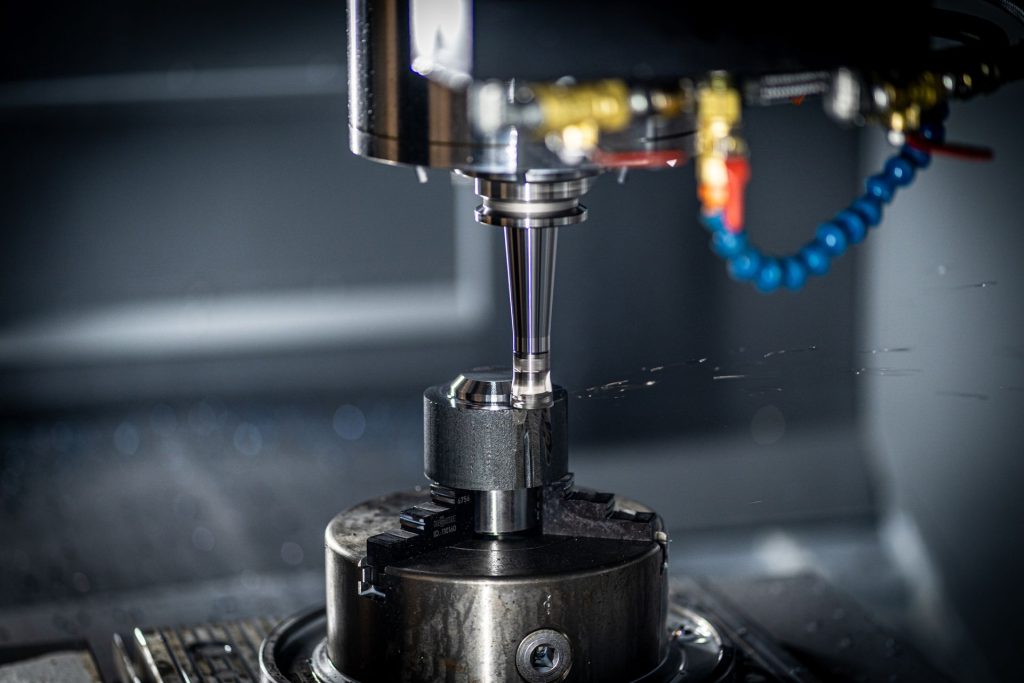
A flat end mill cuts a corner whose radius equals the tool radius when the centerline reaches the theoretically sharp corner. If your print says R 1.0 mm, the largest mill that can finish that corner is 2.0 mm diameter. A 6 mm mill will leave R 3.0 mm of material. The programmer cannot interpret a 6 mm mill into a 1 mm corner.
Matching R exactly to the mill radius also has a finishing problem. The tool is in full radial contact at the corner, feed drops, and you can see a dwell mark. Adding 0.5-1.0 mm of extra radius keeps the finish pass moving. That is why the practical column is not the same as the minimum column.
ASME Y14.5-2018 wants radii either dimensioned or covered by a default note. A missing radius on the PDF with a sharp corner in the STEP is a conflict. ISO 2768-1 (1989) general tolerances do not replace a mill-selection decision. Medium class might allow the wall to be 0.2 mm off. It will not allow a 6 mm mill to pass a 2 mm-wide remaining corner.
L/D is the second number. Stick-out divided by mill diameter near 4:1 is a practical finishing target in 6061. A 20 mm-deep pocket with a 6 mm mill is about 3.3:1. The same pocket with a 2 mm mill is 10:1. 304 and 4140 want even less stick-out because cut forces are higher. If you cannot give the R that unlocks the larger mill, you are buying chatter, not a pretty CAD corner.
On mill-turn parts, do not paste a mill fillet note onto a turned groove. A grooving insert leaves its own corner radii (often R 0.2-0.4 mm). Put those on the CNC turning view.
CNC fillet radius vs end mill size for deep pockets
Depth is where people pick the wrong row in the table.
A 30 mm-deep pocket with R 1.5 mm asks for a 3 mm mill at 10:1 stick-out. That tool will chatter, especially in 304 or 4140. The fix is a larger mill and a larger fillet, or a through-pocket, or a second setup that lets a short mill reach the floor.
Keep depth-to-diameter around 4:1 or better for the finishing mill. If the pocket is 24 mm deep, you want something closer to a 6 mm mill, which means R ≥ 3 mm on the print. If you cannot give that R, split the part, add an access window, or accept EDM in writing.
5-axis CNC machining can shorten stick-out by tilting, which sometimes lets you keep a slightly smaller R. It does not let a 12 mm mill fit a 4 mm-wide slot. Tilt helps reach. Width still sets diameter. A 3+2 program with a 6 mm mill and R 3.5 mm will still beat a 5-axis program that uses a 2 mm mill because the print says R 1.0 mm.
Through-pockets change the math. Mill 12 mm from each side with a short 8 mm mill (R ≥ 4 mm) instead of 24 mm from one side with a long 4 mm mill. If the floor must stay closed, you do not get that trick. Then the fillet has to pay for stiffness.
Walls next to the fillet stack the problem. A 1.0 mm wall in a deep pocket cannot take the radial load of even a 6 mm mill. Thicken the wall or the mill will leave taper at the same corner you just enlarged. CNC fillet radius vs end mill size is not independent of wall thickness.
When you still need a sharp corner
Some assemblies need a square internal corner: a sheet-metal tab, a square nut pocket, a seal that seats to a sharp step.
Do not leave R 0 on a milling drawing and hope. Pick one:
- Dogbone or teardrop: extra radial relief in the corners so a mill can pass and the square part still seats. Put the relief on the print. A typical dogbone for a 6 mm mill is a Ø6-Ø7 hole centered on the sharp corner, or a teardrop that leaves the functional square edges.
- EDM: note “sharp corner, EDM acceptable” and accept a second process. Use this when the corner is a seal or a knife edge you cannot relieve.
- Two-piece design: mill an open corner, then add a wall with screws.
If none of those are allowed, you are buying a tiny mill and a long cycle. Put the tiny R on the sheet so the quote is honest. R 0.5 mm in a 6 mm-deep pocket is a 1 mm mill at 6:1: possible, slow. R 0.5 mm in a 20 mm-deep pocket is not a milling bargain.
ISO 2768-m will not cover an unspecified sharp corner. The shop will either leave a mill radius (nonconforming if you inspect sharp) or price EDM. Write the process.
Decision tree for CAD
Walk this once per pocket family. Then put a default note on the drawing (“internal R 3.5 unless noted”).
- Measure the narrowest pocket width and the depth from the open face.
- If width ≥ 14 mm and depth ≤ 25 mm, start with an 8 mm mill: practical R about 5 mm.
- If width ≥ 10 mm, start with a 6 mm mill: practical R 3.5-4.0 mm. This is the default for most 3-axis housings.
- If width is 6-9 mm, you are in 3-4 mm mill territory: practical R 2.0-2.5 mm. If depth > 16 mm, open the pocket or add a through.
- If you need a sharp internal corner, pick dogbone, EDM, or split parts. Do not enter R 0.2 mm as a milling fillet.
- Overlay STEP vs PDF. If the model still has a 0.3 mm CAD default, fix the model so it matches the note.
- Compute L/D for the mill you chose. If depth/Ø > 4, raise R (larger mill) or split the depth. You are not done at a pretty default note if L/D is 8:1.
- Check the wall next to the fillet. If h/t > 10:1 in 6061, thicken before you argue about 0.2 mm of extra R.
You are done when every internal corner on the quote PDF is either ≥ the mill radius you expect or explicitly tagged as a non-mill process.
Send that pack with material and quantity through YXT CNC contact.
| Pocket width | Pocket depth | Mill to plan | Practical internal R | If you cannot give that R |
|---|---|---|---|---|
| ≥ 16 mm | ≤ 20 mm | 10 mm hog, 8 mm finish | 5-6 mm | You probably can; this is the easy row |
| ≥ 12 mm | ≤ 24 mm | 8 mm or 6 mm | 4-5 mm | Through-pocket or second setup |
| ≥ 10 mm | ≤ 20 mm | 6 mm | 3.5-4.0 mm | Default 3-axis housing row |
| 7-9 mm | ≤ 12 mm | 4 mm | 2.5 mm | Shorten depth; 4 mm mill at 3:1 |
| 7-9 mm | 20 mm | 4 mm at 5:1, poor | Open width or through | Do not keep R 1 mm here |
| ≤ 6 mm | any | 3 mm or smaller | 1.5-2.0 mm | Slot: treat as a cutter width, not a pocket |
Bottom line: width picks the mill, depth vetoes the small mill, and the print R has to match.
Worked RFQ.
A US mechanical engineer sent quantity 15 of a 6061-T6 sensor housing, STEP plus PDF, Type II clear anodize, Ra 3.2 µm default. The pocket was 22 mm deep, 18 mm wide, and the CAD sketch fillet was R 0.5 mm on all internal corners.
Pack 1 (Rev A) PDF said nothing about a default radius. The STEP showed R 0.5 mm. Title block had ISO 2768-m, which made the outline easy and did nothing for the corner. The mill had to assume a 1 mm finishing mill at 22:1 L/D, or a 2 mm mill if they “interpreted” R 1.0 mm and risked a nonconforming corner. Either way the hogging mill could not finish the corner.
Pack 2 (Rev B) after the table: default note “internal R 4.0 unless noted,” STEP rebuilt to R 4.0 mm, pocket width unchanged at 18 mm (an 8 mm mill still fits with room for a finish pass), depth still 22 mm so L/D on an 8 mm mill is 2.75:1 and on a 6 mm finisher is about 3.7:1. One corner that seated a square EMI gasket was not filleted; it got a dogbone Ø6.5 mm on the PDF with a note that the gasket seats on the two straight edges. Material stayed 6061-T6. Quantity stayed 15.
The quote moved because the finishing tool jumped from a 1 mm class mill to a 6-8 mm mill, and the one sharp corner became a defined dogbone instead of an EDM guess. Inspection stayed ISO 2768-m on the walls plus a visual check that the dogbone existed. No unit price is claimed here.
Failure case: Rev B PDF had R 4.0 mm, but the STEP export used an old configuration with R 0.5 mm. The programmer CAM’d the STEP, left R 0.5 mm of stock in the corners relative to the PDF, and first article failed the fillet note. Overlay is part of CNC fillet radius vs end mill size, not extra paperwork.
If Incoterms 2020 is on the RFQ email, it still does not pick your mill diameter.
FAQ
Can I specify a smaller fillet than the end mill and let the shop blend it?
No. The mill cannot cut smaller than its own radius. The shop will change the mill (slower) or leave a larger radius (nonconforming). Put the R you will accept on the print. A 6 mm mill leaves R 3.0 mm if it is driven into the corner. Asking for R 1.0 mm and a 6 mm mill at the same time is two different parts. If you need R 1.0 mm, you need a 2 mm mill and you need L/D to still work. If you need the 6 mm mill, you need R ≥ 3 mm, preferably 3.5-4.0 mm.
Is CNC fillet radius vs end mill size different for ball mills?
Yes for 3D surfacing. A ball mill leaves a cusp, not a sharp vertical wall. For 2.5D pockets with vertical walls, use flat end mills and the table above. A 6 mm ball mill in a floor fillet is a different feature: that is a floor radius, not an internal wall corner. If you need a vertical wall and a floor radius, you may use a bull-nose mill (for example 6 mm with R 0.5 mm corners) and still need the wall corner to clear the tool diameter. Do not dimension a 0.2 mm wall fillet and assume a ball mill will “make it look machined.”
What default internal radius should I put in the title block?
For aluminum housings on 3-axis work, R 3 mm or R 3.5 mm is a practical default. That supports a 6 mm mill. Use a smaller default only if most pockets are genuinely narrow. If most pockets are 16 mm wide and 12 mm deep, R 5 mm (8 mm mill) is a better default and the quote will usually follow. Put exceptions on the pockets that must be smaller. A default of R 0.5 mm because “that is the CAD template” is how every pocket becomes a finishing job.
Why not always use the smallest mill so I can keep sharp-looking corners?
Small mills have low stiffness, low feed, and high breakage risk in deep pockets. Keep tiny mills for tiny features. A 1 mm mill at 10:1 in 304 is a breakage quote. A 1 mm mill at 3:1 in a 3 mm-deep logo pocket is normal. CNC fillet radius vs end mill size is a local choice per pocket family, not a global aesthetic. If the corner is only visual, give it to the 6 mm mill.
Will 5-axis let me ignore fillet vs mill diameter?
No. Five axes can shorten the tool or reach an undercut. The cutter still has a diameter. Width and R still have to clear that diameter. Tilt can turn a 24 mm stick-out into a 12 mm stick-out, which may let you use a 4 mm mill instead of a 6 mm mill. It will not let you use a 10 mm mill in an 8 mm-wide slot. Pick 5-axis when access is the problem. Pick a larger R when stiffness is the problem.
Does ISO 2768 cover an undimensioned internal fillet?
No. ISO 2768-1 (1989) general tolerances cover linear and angular dimensions you did not tighten. They do not pick a mill. An undimensioned sharp CAD corner is a process decision, not a medium-class number. ASME Y14.5-2018 still expects radii to be defined or defaulted. Put “internal R 3.5 unless noted” in the title block, or dimension the corners that matter. Leaving the fillet off the PDF while the STEP is sharp is a file conflict, which is worse than a tight R.
What about external fillets and edge breaks?
External radii do not set mill diameter the same way. A 0.2-0.5 mm edge break is often a 45° mill or a deburr pass and barely moves the quote. Do not confuse those with internal pocket fillets. An external R 3 mm on a housing corner is cosmetic or a knock-protection choice. An internal R 3 mm is a 6 mm mill. Put internal R in the default note. Put external breaks in a general edge note so nobody CAM’s a 1 mm mill to “match” a 0.3 mm outside chamfer.
Treat CNC fillet radius vs end mill size as a table lookup: choose the mill from pocket width and depth, then set internal R to at least half that diameter, preferably 0.5-1 mm more. Put the default on the PDF, match the STEP, and send the pack via YXT CNC contact when you want the pocket priced with a real tool list.